While you can fully immerse yourself in the world of *Path of Exile 2* solo, sometimes teaming up with friends can make your journey much smoother. Here's a comprehensive guide on the trading system and market within *Path of Exile 2*, ensuring you can navigate and utilize it effectively.
Table of Contents
- How to Trade in Path of Exile 2
- Trading In-Game
- Path of Exile 2 Trade Market
How to Trade in Path of Exile 2
Trading in *Path of Exile 2* can be accomplished through two primary methods: direct in-game trading or using the official trade website. Let's delve into each approach for a seamless trading experience.
Trading In-Game
If you find yourself in the same game instance as another player, trading is straightforward. Simply right-click on their character and select the "Trade" option. A trade window will open, allowing both parties to select and agree on the items to be exchanged. Once satisfied, confirm the trade to complete the transaction.
Additionally, you can initiate trades through the game's global chat or direct messages. To do this, right-click on the player's name in the chatbox and invite them to your party. After teleporting to their location, right-click their character again to start trading.
Path of Exile 2 Trade Market
*Path of Exile 2* features an auction house-like system accessible only through the official trade site, which you can visit here. Remember, you must have a PoE account linked to your gaming platform to participate.
To purchase an item, utilize the site's filters to find what you're looking for. Once you spot an item of interest, click the "Direct Whisper" button to send an in-game message to the seller, setting up a meeting to finalize the transaction.
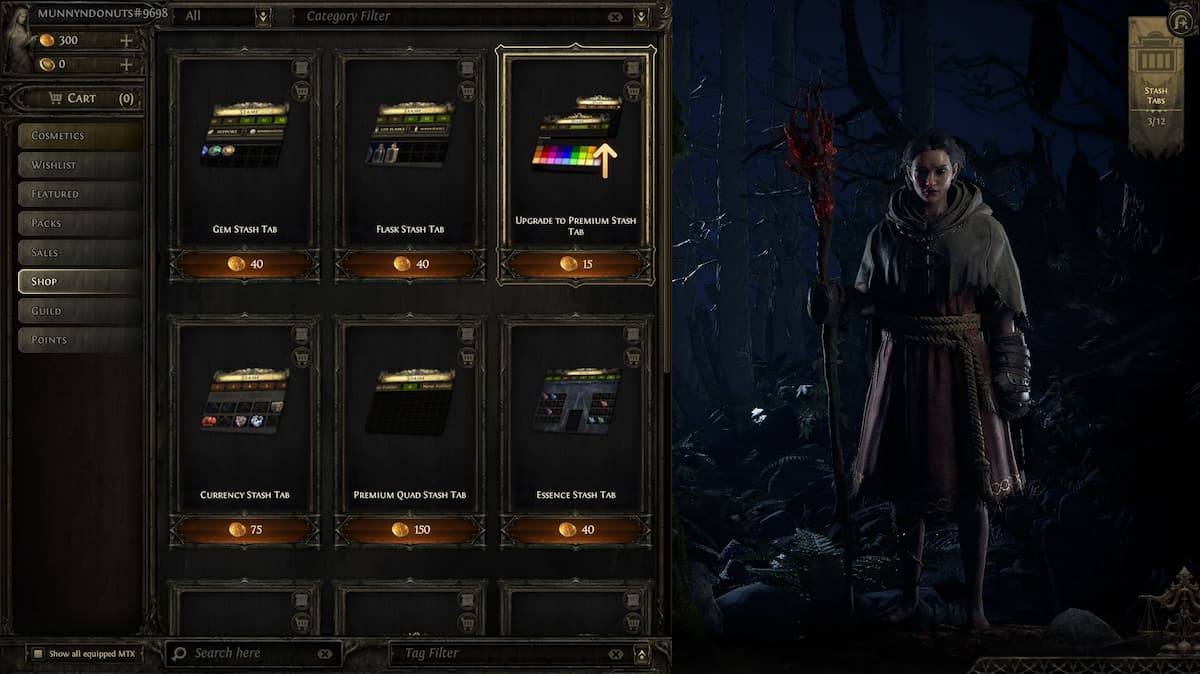
Selling items requires a Premium Stash Tab, purchasable from the in-game Microtransaction Shop. Place your item in the Premium Stash, set it to "Public," and right-click to set a price. Your item will automatically appear on the trade site. When a buyer contacts you via in-game message, you can arrange the trade.
That covers the essentials of trading and the trade market in *Path of Exile 2*. For more insights and troubleshooting tips, such as how to resolve freezing issues on PC, be sure to check out resources like The Escapist.

 LATEST ARTICLES