Monster Hunter Wilds boasts stunning visuals, but achieving optimal performance while retaining visual fidelity requires careful graphics setting adjustments. This guide outlines the best settings for various PC builds.
Recommended Videos Monster Hunter Wilds System Requirements
High resolutions and maximum settings demand a powerful CPU and high-end GPU with ample VRAM. Find out where to purchase Monster Hunter Wilds for your platform.
| Minimum Requirements | Recommended Requirements |
OS: Windows 10 or newer
CPU: Intel Core i5-10600 / AMD Ryzen 5 3600
Memory: 16GB RAM
GPU: NVIDIA GTX 1660 Super / AMD Radeon RX 5600 XT (6GB VRAM)
DirectX: Version 12
Storage: 140GB SSD required
Performance Expectation: 30 FPS @ 1080p (upscaled from 720p) | OS: Windows 10 or newer
CPU: Intel Core i5-11600K / AMD Ryzen 5 3600X
Memory: 16GB RAM
GPU: NVIDIA RTX 2070 Super / AMD RX 6700XT (8-12GB VRAM)
DirectX: Version 12
Storage: 140GB SSD required
Performance Expectation: 60 FPS @ 1080p (Frame Generation enabled) |
Monster Hunter Wilds Best Graphics Settings
Optimizing Monster Hunter Wilds graphics settings is crucial, regardless of your hardware. Significant performance gains are possible without sacrificing visual quality. The difference between Ultra and High settings is often minimal visually, but the performance impact is substantial.
Display Settings
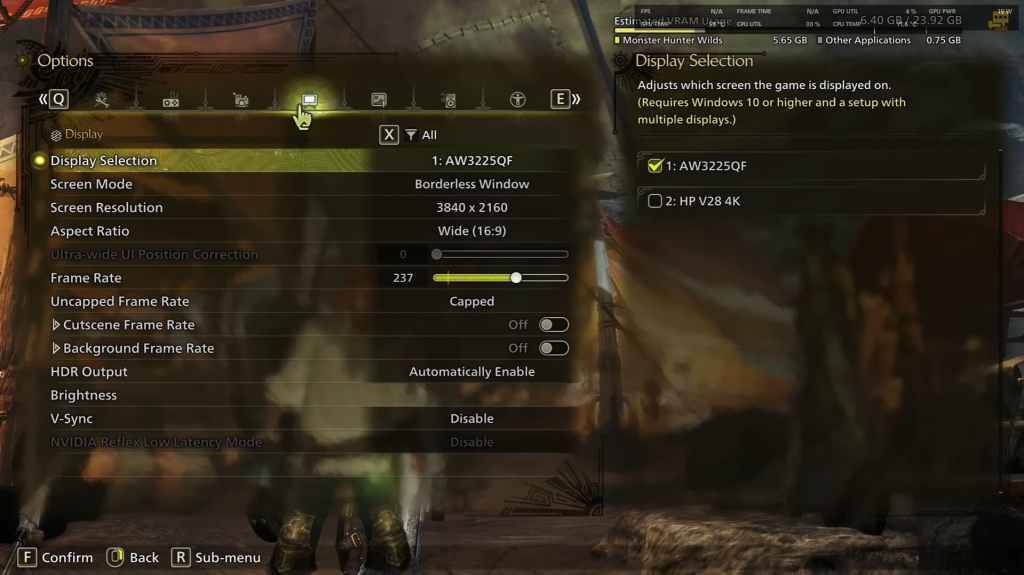
Screen Mode: Personal preference; Bordered Fullscreen offers better performance when tabbing out frequently. Resolution: Your monitor's native resolution. Frame Rate: Match your monitor's refresh rate (e.g., 144Hz, 240Hz). V-Sync: Off for reduced input lag.
Graphics Settings
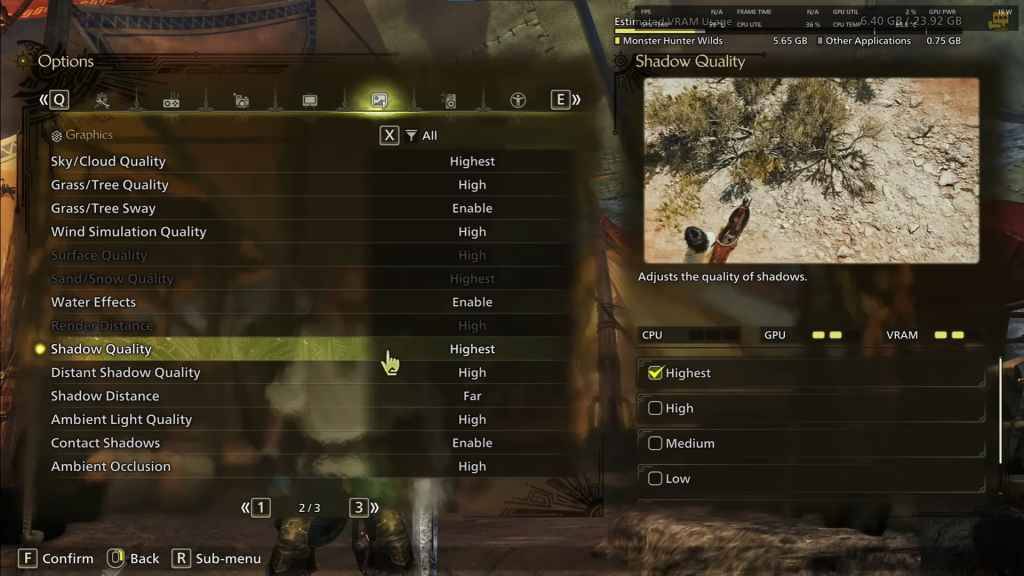
| Setting | Recommended | Description |
| Sky/Cloud Quality | Highest | Enhances atmospheric detail. |
| Grass/Tree Quality | High | Affects vegetation detail. |
| Grass/Tree Sway | Enabled | Adds realism; minor performance impact. |
| Wind Simulation Quality | High | Improves environmental effects. |
| Surface Quality | High | Details on the ground and objects. |
| Sand/Snow Quality | Highest | For detailed terrain textures. |
| Water Effects | Enabled | Adds reflections and realism. |
| Render Distance | High | Determines how far objects are rendered. |
| Shadow Quality | Highest | Improves lighting; demanding. |
| Distant Shadow Quality | High | Enhances shadow detail at a distance. |
| Shadow Distance | Far | Controls how far shadows extend. |
| Ambient Light Quality | High | Enhances shadow detail at a distance. |
| Contact Shadows | Enabled | Enhances small object shadowing. |
| Ambient Occlusion | High | Improves depth in shadows. |
These settings prioritize visual fidelity. Since Monster Hunter Wilds isn't a competitive game, excessive frame rate optimization at the cost of visuals diminishes the experience. However, adjust these settings based on your specific hardware.
To improve performance, prioritize reducing Shadows and Ambient Occlusion. Lowering Distant Shadows, Shadow Distance, Water Effects, and Sand/Snow Quality also yields significant FPS gains.
Best Settings for Different Builds
Not all PCs can handle maximum settings. The following recommendations cater to different hardware tiers. Settings not listed should remain at their defaults.
Mid-Range Build (GTX 1660 Super / RX 5600 XT)
Resolution: 1080p Upscaling: AMD FSR 3.1 Balanced Frame Gen: Off Textures: Low Render Distance: Medium Shadow Quality: Medium Distant Shadow Quality: Low Grass/Tree Quality: Medium Wind Simulation: Low Ambient Occlusion: Medium Motion Blur: Off V-Sync: Off Expected Performance: ~40-50 FPS at 1080p
Recommended Build (RTX 2070 Super / RX 6700XT)
Resolution: 1080p Upscaling: FSR 3.1 Balanced Frame Gen: Enabled Textures: Medium Render Distance: Medium Shadow Quality: High Distant Shadow Quality: Low Grass/Tree Quality: High Wind Simulation: High Ambient Occlusion: Medium Motion Blur: Off V-Sync: Off Expected Performance: ~60 FPS at 1080p
High-End Build (RTX 4080 / RX 7900 XTX)
Resolution: 4K Upscaling: DLSS 3.7 Performance (NVIDIA) / FSR 3.1 (AMD) Frame Gen: Enabled Textures: High Render Distance: Highest Shadow Quality: High Distant Shadow Quality: High Grass/Tree Quality: High Wind Simulation: High Ambient Occlusion: High Motion Blur: Off V-Sync: Off Expected Performance: ~90-120 FPS at 4K (upscaled)
Monster Hunter Wilds offers numerous graphical options, but shadows, ambient occlusion, and render distance significantly impact performance. Budget builds benefit from FSR 3 upscaling, while high-end systems can leverage 4K with frame generation. A balanced approach using a mix of medium-high settings, upscaling, and adjusted shadow/distance settings provides the best results.
Monster Hunter Wilds is available now on PlayStation, Xbox, and PC.

 LATEST ARTICLES